This is a website where you can play with Langton's Ant in your browser. Various extended versions are available to try.
This is my first time creating a site like this, so there may be some inconveniences. Any feedback, no matter how small, in the comments section below would be greatly appreciated.
Also, since I am Japanese, my English may be unnatural in some ways.
Sorry, the image is not in English yet because I have to replace it.
Langton's Ant is a type of cellular automaton, a simulation where a virtual "ant" moves based on simple rules.
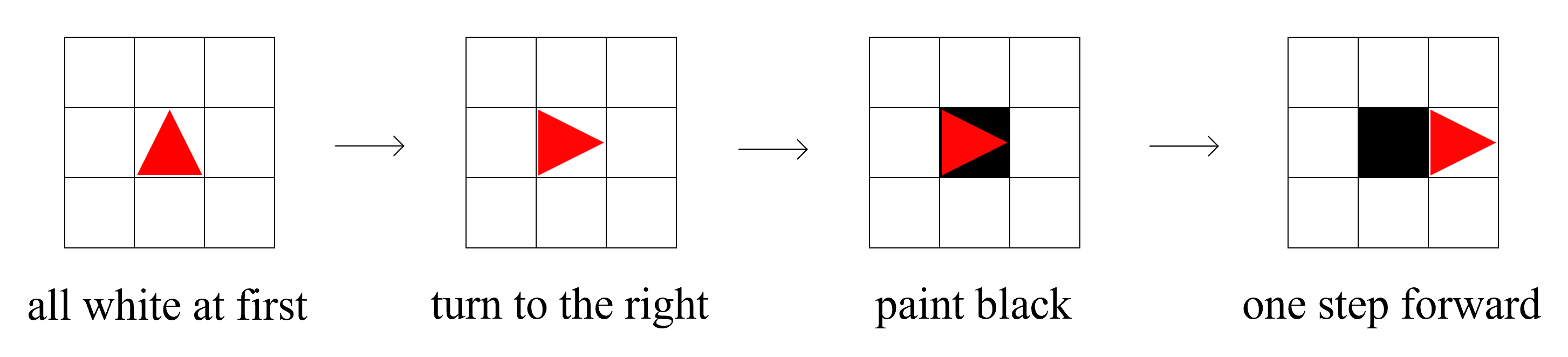
In short, it's a simulation where an ant moves on a grid of black and white squares, flipping their colors according to a rule. Here, the ant is represented by a red triangle.
It was created by Christopher Langton*¹, and it's said to have gotten its name because the way the squares are flipped resembles a moving ant.
The ant repeats these three rules in order. Starting from an initial configuration*² where all squares are white, the ant's movement initially appears chaotic, but after about 10,000 steps, it begins to build a "highway." It has been experimentally shown that it creates a highway from any initial configuration.
*1 Christopher Langton (1949-?) is an American computer scientist and a pioneer in artificial life research.
*2 The initial configuration refers to the state (black or white) of the squares. However, the number of either white or black squares must be finite.
You can play with Langton's Ant using the buttons below. If you are on a smartphone or tablet, please press the "Mobile Version" button before selecting a mode.
Instructions and explanations are provided below. If you don't understand the rules, I recommend starting with the Normal Mode.
The Pattern Gallery is a place where various ant trail patterns are recorded. There are many interesting trails, so please take a look.
Click on each mode's button to display its instructions.
Press the tutorial button on the right to jump to the tutorial, which explains how to use the site and provides an overview of Langton's Ant.
You can watch the standard Langton's Ant in action. You can play by changing the initial configuration or adding more ants.
The red triangle is the ant. The instructions button will show you controls almost identical to the ones listed below.
Try drawing a picture and letting the ant move. It should build a highway no matter what you draw.
The basic controls are the same as in Normal Mode. You can add a condition: "every n steps, move forward k steps without turning."
Additionally, you can change the number of steps taken when turning left or right.
Try out various combinations. There are many interesting patterns, including some that build a highway from the start. Setting n=0 results in normal behavior.
In this mode, the direction of movement is determined by the combination of colors of the "previous square" and the "current square."
There are 4 combinations of black and white, and 4 directions (up, down, left, right) for each, resulting in 256 possible rule sets. The first step is treated as if the previous square was white.
This mode often produces more orderly patterns, such as expanding spirals. A Left-Right-Left-Right rule set will replicate the Normal Mode.
This mode uses more colors. The ant follows the rule for the color of the square it's on: turn left or right, change the square's color to the next one in the sequence, and then move forward.
The color sequence is: White → Black → Red → Blue → Green → Yellow → Purple → Orange → Cyan → Pink → Brown → Gray. A maximum of 12 colors can be used.
For example, with 3 colors and a rule of Left-Right-Left, if the ant is on a red square, it will turn left, change the color to white, and move forward.
If you use an even number of colors and an alternating Left-Right rule, it will behave like the Normal Mode.
The ant itself has multiple states, and its behavior changes depending on its current state.
For example, the default rule set has two states (0 and 1):
In state 0, if on a white square, it moves forward 1 step without turning or inverting the color, and changes to state 1.
If on a black square, it inverts the color, turns right, moves forward 1 step, and changes to state 1.
In state 1, if on a white square, it inverts the color, turns left, moves forward 1 step, and changes to state 0.
If on a black square, it inverts the color, moves forward without turning, and stays in state 1.
If you set color inversion to 'Yes' for all states and set the direction to 'Right' for white and 'Left' for black, it will behave like the Normal Mode.
This mode uses a hexagonal grid. Normally, if the ant is on a black hex, it turns 60° left and moves forward; if on a white hex, it turns 60° right and moves forward. The controls are the same as in Normal Mode.
In Multi-Color mode, the rules are the same as the standard Multi-Color mode, but with six possible directions: Up-Right, Down-Right, Down, Down-Left, Up-Left, Up.
In Conditional mode, the rules are the same as the standard Conditional mode: every n steps, it moves forward k steps without turning.
In this mode, the ant's movement is based on the Collatz conjecture. The Collatz conjecture is:
The conjecture, which is an unsolved problem in mathematics, states that repeating step 2 will eventually lead to the number 1 for any starting integer. After reaching 1, the sequence enters a cycle: 1 → 4 → 2 → 1 → 4 → 2...
This is similar to Langton's Ant in that it seems to always converge and form a cycle from any initial state (initial value), which is experimentally observed but not mathematically proven.
In this mode, the ant moves according to the operations on the initial value. You can also modify the rules, for example, dividing by 4 if even.
The default setting is: if n is even, divide n by 2, invert the square's color, and move right. If n is odd, multiply n by 3 and add 1, invert the color, and move left.
The simulation stops automatically when n reaches 1. Pressing the start button again will continue the movement. Note that if n is not divisible, the result will be truncated (floor division).
Currently, the square's color is not used for branching decisions, but I'd like to create something where the black/white color of the square also influences the path.
History